
Vehicle Verification Sindh: Check Any Car or Bike by Number or CNIC
Vehicle verification Sindh is the first check every buyer should run before paying for a car or motorcycle with Sindh plates. In a minute or two, the official Excise Sindh service confirms the public record of the vehicle, so you can match it against the seller’s documents and the vehicle itself.
The department offers two free ways to check. First, you can search one vehicle by its registration number. Second, you can list the vehicles registered against a CNIC. Choose the option that fits your situation below, and then follow the guide to read the result like an expert.
How to Check a Vehicle by Registration Number
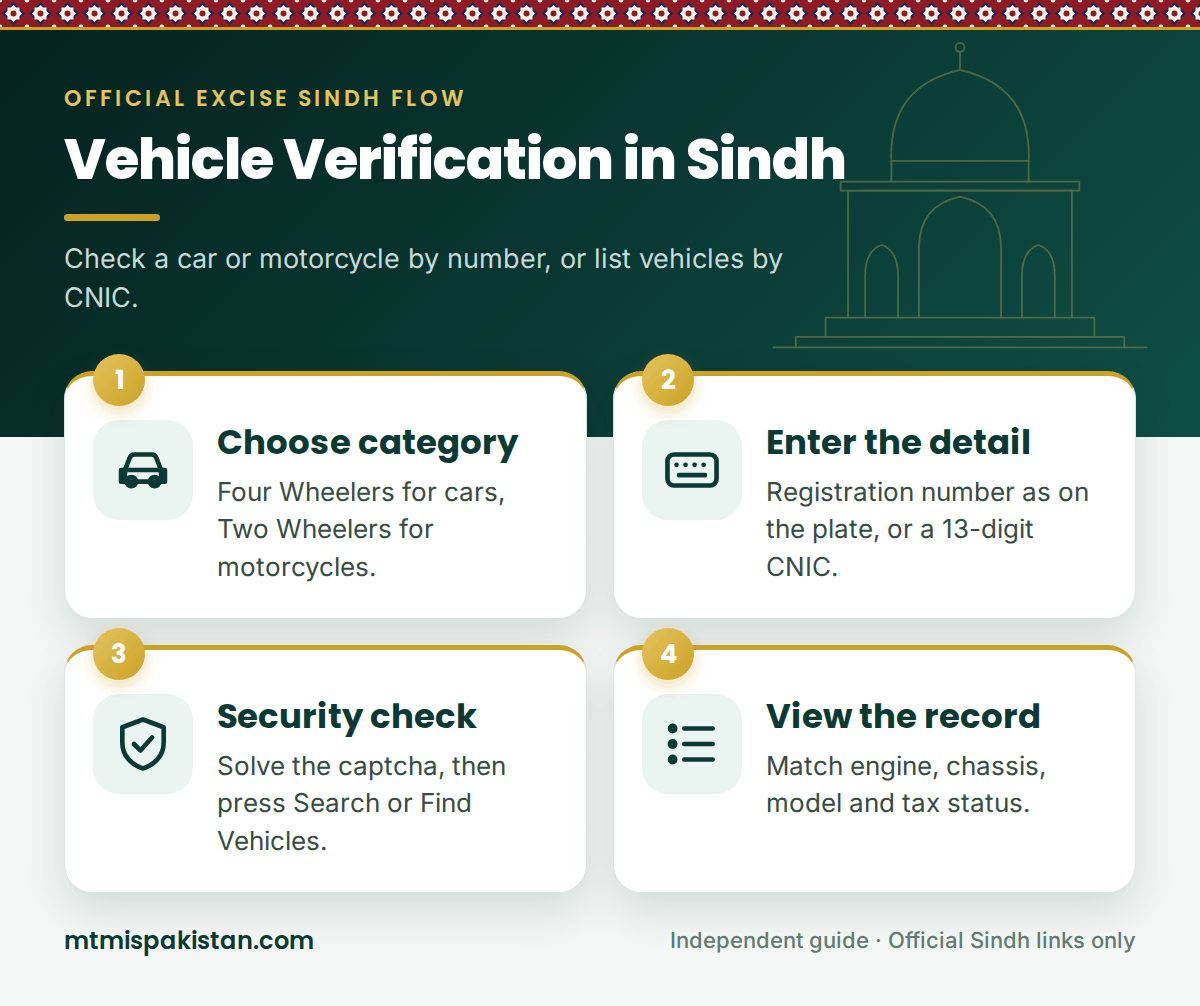
Generally, the registration number search is the quickest route for a vehicle verification in Sindh. The official page on excise.gos.pk works in three short stages:
- Choose the category. Select Four Wheelers for a car, jeep or similar vehicle, or Two Wheelers for a motorcycle or scooter.
- Enter the number. Type the registration number exactly as it appears on the number plate, including the hyphen, for example ABC-123.
- View the record. Complete the security check, press Search and read the result carefully.
Sindh numbers mix letters and digits. In fact, the department's own form stresses that you should copy the plate exactly. So, if the search fails, check the letters first, because a single wrong letter points to a different vehicle or to nothing at all.
How to Check Vehicles by CNIC in Sindh
Meanwhile, the CNIC search answers a different question: which vehicles are registered against this identity card? For a vehicle verification in Sindh, it helps when you want to review your own record or confirm what a seller owns.
- Open the CNIC service. Use the Option 2 card above.
- Choose the category. Select Four Wheelers or Two Wheelers, because the search runs on one category at a time.
- Enter the CNIC. Type all 13 digits, for example 42101-1234567-1. The dashes are optional.
- Find the vehicles. Complete the security check and press Find Vehicles.
- Open a vehicle. Pick a vehicle from the list to see its public details.
For privacy, the department shows only the selected vehicle's public details. Indeed, the official page states that the CNIC and contact information are never included in the result. That rule protects owners, so treat any website that promises a stranger's address or phone number with suspicion.
Vehicle Number vs CNIC: Which Search Should You Use?
Both options are free. Even so, each one suits a different job. The table below compares them side by side.
| Feature | By vehicle number | By CNIC |
|---|---|---|
| What you enter | Category and registration number | Category and 13-digit CNIC |
| What you get | The record of one vehicle | A list of vehicles against that CNIC |
| Best for | Checking a car or bike before you buy it | Reviewing everything in your own name |
| Privacy | Shows public vehicle details only | Never shows the CNIC or contact details |
What a Vehicle Verification in Sindh Shows
The exact fields can vary from one record to another. Still, a vehicle verification in Sindh usually covers the details below, and each one deserves a careful look.
| Field | What it tells you | What to check |
|---|---|---|
| Registration number | The number assigned in Sindh | It must match the plate and the registration book |
| Make, model and year | The manufacturer, variant and model year | Watch for a lower variant sold as a higher one |
| Engine number | The unique engine identifier | It must match the stamp on the engine |
| Chassis number | The unique frame number | It must match the chassis stamp digit for digit |
| Colour and body type | The registered appearance | A repaint should appear in the record |
| Registration date | When the vehicle entered the Sindh record | It shows the real age on the road |
| Tax status | Whether motor vehicle tax is up to date | Arrears usually pass to the new owner |
Moreover, some older results also carried a CPLC (Citizens-Police Liaison Committee) status for theft reports. If your result does not show one and you have doubts, call CPLC on 1102 with the registration and chassis numbers.
Red Flags a Vehicle Verification in Sindh Can Reveal
A clean record is reassuring. Yet the real value of a check lies in the warning signs it exposes.
No Record Found
First, re-enter the number, and make sure you picked the right category. If the vehicle still does not appear, it may be registered in Punjab, Islamabad or another province, so check the correct system before you go further.
Chassis or Engine Numbers Differ
Such a mismatch can point to a cloned plate, tampering or an engine swap that nobody recorded. In that case, stop the deal and report the vehicle to the Excise office and the police.
Unpaid Tax or Pending Challans
Unpaid tax and traffic fines rarely disappear when a vehicle changes hands. Therefore, check the tax on the Sindh token tax payment guide and search the plate on our e-challan Sindh page before you pay.
The Seller Is Not the Owner
Karachi police now act against vehicles that sit in someone else's name, and an open transfer letter is no longer a safe shortcut. So, insist on a proper transfer, and meet the registered owner in person if the seller is only an agent.
Vehicle Verification Sindh Problems and Fixes
The official vehicle verification Sindh service is reliable. However, small mistakes cause most failed searches. The table below lists the usual ones.
| Problem | Likely cause | Fix |
|---|---|---|
| "No record found" | Wrong letters, a missing hyphen or the wrong category | Copy the plate exactly and switch the category |
| CNIC search shows nothing | No vehicles in that category, or a typing error | Try the other category, then re-enter all 13 digits |
| Security check keeps failing | An expired check or a slow connection | Refresh the page and try again |
| Old owner still shown | The transfer is not complete in the record | Wait for the Excise office to finish the transfer |
| Tax paid but shown unpaid | The payment has not synced yet | Wait a few working days and keep your receipt |
Vehicle Verification Sindh Checklist for Used Car Buyers
A vehicle verification in Sindh works best as part of a wider inspection. Before you hand over any money, work through this checklist with the seller:
- Run the vehicle number search, and save a screenshot of the result.
- Then match the engine and chassis stamps with the result, digit for digit.
- Compare the seller's original CNIC with the registration book or smart card.
- Also check the tax status, and ask the seller to clear any arrears.
- Search the plate for unpaid traffic e-challans.
- Confirm that the plate is a genuine Excise-issued Ajrak security plate.
- Finally, sign a dated sale agreement and book the transfer at the Excise office.
Buying from another city? You can still run the vehicle verification Sindh search from Lahore, Islamabad or abroad, because the service works anywhere online. Then ask a trusted person nearby to inspect the vehicle before you travel.
After a Clean Vehicle Verification in Sindh
Once the record checks out, move straight to the paperwork. Next, make sure the vehicle carries a genuine Ajrak security plate with a Sindh number plate check, and clear any dues before the transfer.
After that, complete the transfer at the Excise office with both parties' original CNICs, because the department now uses biometric verification for transfers. Finally, keep every receipt together, since you will need them at the next sale.
Frequently Asked Questions About Vehicle Verification in Sindh
Is vehicle verification in Sindh free?
Yes. Every vehicle verification in Sindh on excise.gos.pk is free, whether you search by vehicle number or CNIC. Still, be careful with agents or apps that charge a fee for the same official check.
Can I verify a Sindh vehicle by chassis number?
The public service searches by registration number or CNIC, not by chassis number. Instead, use the chassis number as a physical check, and match it digit for digit against the verification result.
Is there an SMS service for vehicle verification in Sindh?
The department's online services page does not list an SMS code. Some websites publish short codes that belong to other provinces, so rely on the official online search or the Excise Sindh app.
Can I check a motorcycle in Sindh?
Yes. For a motorcycle, vehicle verification in Sindh works just like it does for a car. Simply select Two Wheelers as the category, and then search by registration number or CNIC.
Does the CNIC search show vehicles from other provinces?
No. It lists only vehicles in the Sindh record. For other provinces, use our MTMIS Punjab or MTMIS Islamabad guides.
Does a clean result prove the vehicle is not stolen?
Not on its own. Excise records confirm registration details, while theft reports sit with the police and CPLC. For full peace of mind, check with CPLC on 1102 as well.
Verify First, Pay Later
Vehicle verification in Sindh takes a minute, costs nothing and protects one of the biggest purchases you will make. Search the record, match every number on the vehicle and walk away from any deal that fails a close look.
So, use the Option 1 or Option 2 card at the top of this page, and keep this guide open while you inspect the vehicle. For every other Sindh service, visit our MTMIS Sindh guide, or reach us through the Contact Us page.
Disclaimer: MTMIS Pakistan is an independent information website and is not affiliated with the Excise, Taxation and Narcotics Control Department, Government of Sindh. Always confirm vehicle records with the official department before you buy.
Last reviewed: September 2026