
Pay Sindh Token Tax Online: Quick Pay, PSID and Every Payment Method
You can pay Sindh token tax online in about five minutes, without standing in a bank queue or visiting an Excise office. The department’s Quick Pay portal calculates what you owe, including any arrears, and gives you a 12-digit PSID that you pay from your phone, an ATM or a bank counter.
What You Need to Pay Sindh Token Tax Online
Quick Pay asks for very little, so gather these details first:
- Vehicle type: 4 Wheeler for a car or jeep, or 2 Wheeler for a motorcycle.
- Mobile number: in the format 03XXXXXXXXX, because the PSID and confirmation arrive by SMS.
- Registration number: written with the hyphen, for example ABC-123.
- A way to pay: an ATM card, a banking app, an Easypaisa or JazzCash account, or a debit or credit card.
You do not need your CNIC, chassis number or engine number for a Quick Pay payment. That simplicity is exactly why it is the fastest way to pay Sindh token tax online.
How to Pay Sindh Token Tax Online with Quick Pay
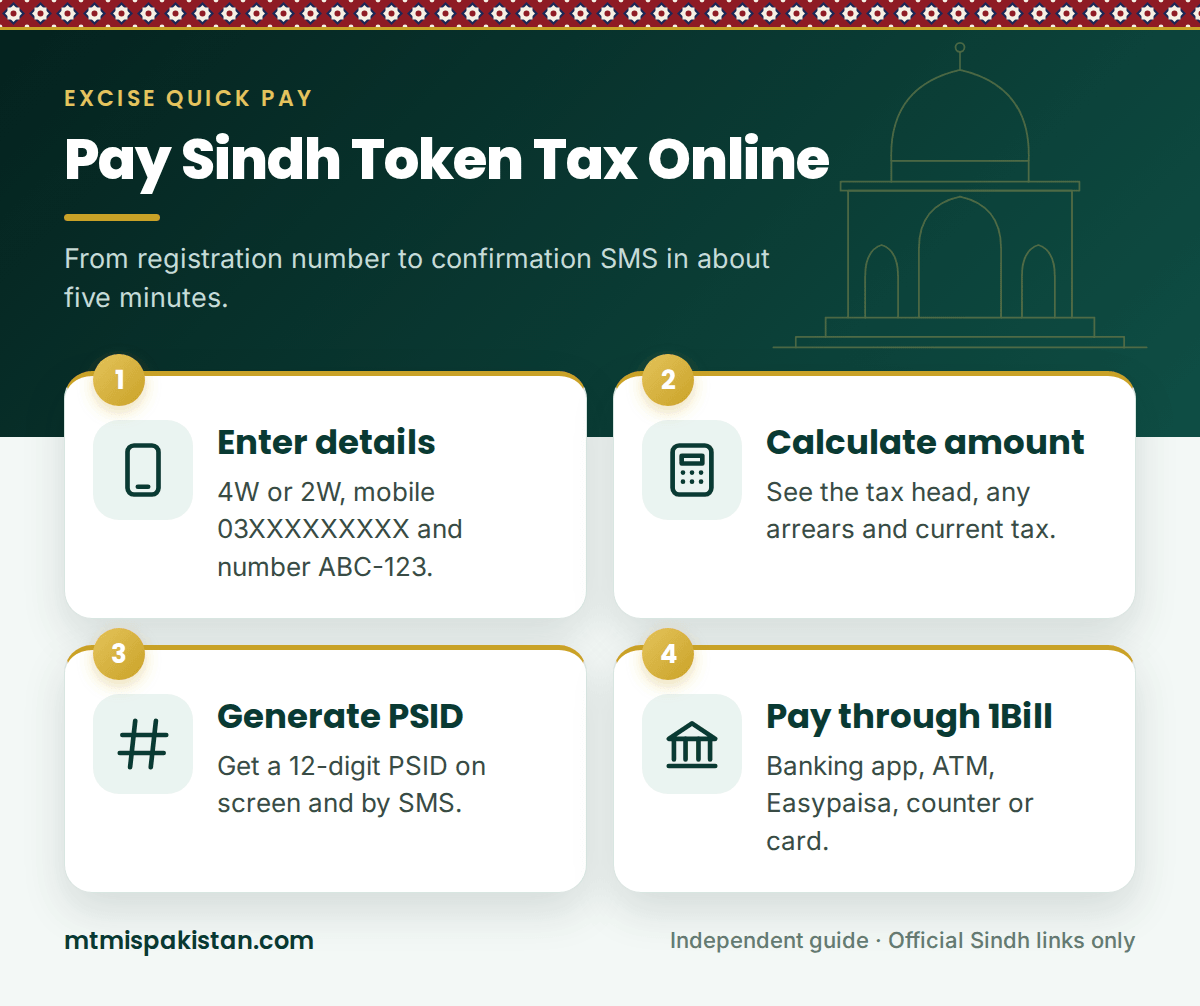
The whole process takes place on the Excise tax portal. Follow these steps:
- Open Quick Pay. Use the button above to reach the official portal.
- Select the vehicle type. Choose 4 Wheeler or 2 Wheeler.
- Enter your details. Type your mobile number and the registration number, and then enter the captcha code.
- Press Vehicle Details. The portal fetches the vehicle so you can confirm it is the right one.
- Press Calculate Amount. The portal shows your tax head, any arrears and the current tax.
- Generate the PSID. Tick the courier box only if you want a printed challan, and then press Generate PSID.
- Pay the PSID. Use any of the payment methods below, and wait for the confirmation SMS.
Reading the Amount Screen
The Calculate Amount screen splits your bill into parts. Here is what each one means.
| Item | What it means |
|---|---|
| Tax head | The type of tax being charged, such as motor vehicle tax |
| Arrears | Unpaid tax from earlier years, which you must clear as well |
| Current tax | The tax for the current year, from July to June |
| Service charges | Applied only if you choose courier delivery of the challan |
If the arrears look wrong, stop before you generate the PSID. Instead, call the Excise call centre on (021) 111-374-634 and ask them to check the record.
Ways to Pay Your PSID
A PSID (Payment Slip ID) works through the 1Link 1Bill network, so almost every bank and wallet in Pakistan accepts it. That flexibility is what makes it so easy to pay Sindh token tax online. The portal lists these options:
| Payment method | How to pay | Best for |
|---|---|---|
| Internet or mobile banking | Payments, then 1Bill Invoice/Voucher, then enter the PSID | Most people with a bank account |
| ATM | Bill Payments, then 1Bill Invoice/Voucher Payment, then enter the PSID | Paying with a debit card |
| Easypaisa app | Bill type 1Bill Invoice/Voucher, then enter the PSID | Mobile wallet users |
| Over the counter | Give the PSID at a 1Link member bank or branchless agent | Paying in cash |
| BlinQ | Debit or credit card, Easypaisa and JazzCash, or account transfer | Paying by card directly from the portal |
How to Pay Sindh Token Tax Online in Your Banking App
This is the most popular way to pay Sindh token tax online. First, log in to your bank's app, and open Payments or Bill Payments. Then choose 1Bill Invoice/Voucher, enter the 12-digit PSID and press OK.
The app fetches the details automatically, so check the name and amount before you confirm. After that, the Excise department sends a confirmation SMS to the mobile number you entered on Quick Pay, and your bank may send its own message too.
Banks That Accept the Sindh Excise PSID
The portal lists 28 banks and microfinance banks on 1Bill, although each one supports different channels. Examples include Meezan Bank, Allied Bank, Bank Al-Habib, Askari Bank, Habib Metropolitan Bank, Standard Chartered, Dubai Islamic Bank, JS Bank, Bank of Punjab, Sindh Bank and the National Bank of Pakistan. In some cases, a bank supports only ATM or counter payments, so use another channel if your app does not show 1Bill.
Getting Your Challan by Courier
Quick Pay also offers to post a printed challan to you. If you tick "Deliver Challan to me via Courier", the portal asks for your name, address, city and province. It accepts addresses in Sindh, Punjab, Balochistan and Khyber Pakhtunkhwa.
A service charge applies to courier delivery, and the portal adds it to your PSID. Most people skip it, because the SMS and the portal's Reprint Challan Receipt option already give you proof of payment.
After You Pay Sindh Token Tax Online
Keep the confirmation SMS and a screenshot of your bank receipt. If you need a formal copy, the portal also has a Reprint Challan Receipt option.
The vehicle record does not always update the same day. Some users report that it can take several working days, and older guides mention up to ten. So, if a vehicle verification in Sindh still shows the tax as unpaid, wait a few days before you contact the call centre with your PSID.
Token Tax Deadline and the Cost of Not Paying
Sindh's motor vehicle tax runs on the tax year from 1 July to 30 June. So, the simplest habit is to pay Sindh token tax online every July, as soon as the new tax year starts. Unpaid tax turns into arrears, and you must clear those arrears before a transfer can go through.
The penalties have also become much tougher. On 5 August 2026, the Sindh Cabinet approved a policy for vehicles that have not paid tax since July 2010. Under it, registrations of off-road vehicles with outstanding dues can be suspended after 30 days and cancelled after 60 days. Therefore, if you own an old vehicle with years of arrears, check the amount on Quick Pay now.
Official Apps for Paying Token Tax
The tax portal directs mobile users to its ePayment app for Android and iPhone, which lets you pay Sindh token tax online with the same Quick Pay steps. Separately, the department's Excise Sindh app handles vehicle verification and the tax calculator.
Either way, download apps only from the official links on excise.gos.pk or the tax portal. Fake apps and payment links do circulate, and a genuine PSID payment never asks for your card PIN on a website.
Quick Pay Problems and Fixes
Most failed attempts to pay Sindh token tax online come down to a small detail. The table below covers the usual ones.
| Problem | Likely cause | Fix |
|---|---|---|
| Vehicle not found | Missing hyphen or wrong vehicle type | Enter the number as ABC-123 and check 4W or 2W |
| Captcha keeps failing | The code has expired | Refresh the image and type the new code |
| PSID not accepted by the bank | Expired PSID or a typing error | Generate a fresh PSID and enter all 12 digits |
| No confirmation SMS | Wrong mobile number on Quick Pay | Keep the bank receipt and call the call centre |
| Tax still shows unpaid | The record has not synced yet | Wait several working days, then contact the department |
Frequently Asked Questions About Paying Sindh Token Tax Online
How do I pay Sindh token tax online?
Open Quick Pay on taxportal.excise.gos.pk, enter your vehicle type, mobile number and registration number, and then generate a PSID. Finally, pay the PSID through 1Bill in your banking app, at an ATM, with Easypaisa or by card.
What is a PSID?
A PSID is a 12-digit Payment Slip ID that identifies your tax bill. Any bank or wallet on the 1Link 1Bill network can then fetch the amount and accept the payment.
Can I pay Sindh token tax online with JazzCash or Easypaisa?
Yes. You can pay Sindh token tax online by entering the PSID in the Easypaisa app. In addition, the portal's BlinQ option accepts Easypaisa and JazzCash accounts.
How much is Sindh token tax for my car?
It depends on engine capacity. For example, private cars up to 1,000cc pay Rs 1,500 a year, and cars from 1,001cc to 1,300cc pay Rs 2,000. Our Sindh vehicle tax calculator guide lists every band.
Can I pay token tax for a car registered in someone else's name?
Yes. Anyone can pay Sindh token tax online for a vehicle, because Quick Pay works with the registration number and any mobile number. Still, transfer the vehicle into your own name soon, because Karachi police now act against vehicles that are not transferred.
Can I pay a traffic e-challan on Quick Pay?
No. Quick Pay is for Excise taxes and fees. Traffic e-challans belong to Sindh Police, so see our e-challan Sindh guide instead.
Pay Once, Drive Worry-Free
Paying Sindh token tax online takes one PSID and a few taps in your banking app. Clear any arrears, save the confirmation and recheck the record a few days later.
So, use the Open Quick Pay button above whenever your tax falls due. For every other Sindh service, visit our MTMIS Sindh guide, or reach us through the Contact Us page.
Disclaimer: MTMIS Pakistan is an independent information website and is not affiliated with the Excise, Taxation and Narcotics Control Department, Government of Sindh, or 1Link. Payment options can change, so always follow the instructions on the official portal.
Last reviewed: September 2026