
MTMIS Punjab Application Tracking: Check Your Registration or Transfer Status
You have finished the biometric transfer, paid the fees and walked out of the MRA office with a receipt. Now comes the waiting. MTMIS Punjab application tracking lets you follow that file online, so you know whether it is still in process, approved, printed or already on its way to you.
This guide also explains where to find your tracking ID, how to check the status in under a minute, what each stage means and what to do if your application stops moving. So, use the tracking tool below, or follow the steps to use the official portal.
What MTMIS Punjab Application Tracking Covers
The Excise, Taxation and Narcotics Control Department records most vehicle services as applications. Each one then moves through several desks before the department completes it, and MTMIS Punjab application tracking shows where your file sits right now.
For example, you can typically follow these applications online:
- New registration of a car, motorcycle or commercial vehicle
- Ownership transfer after a used-vehicle sale
- Smart card issue, including cards for new registrations and transfers
- Duplicate smart card after a loss or damage
- Other counter services that generate a receipt with a tracking ID at the MRA
In short, if the MRA counter gave you a receipt with a tracking ID, you can probably follow that request online.
Where to Find Your MTMIS Punjab Application Tracking ID
Your tracking ID is the key to MTMIS Punjab application tracking, so find it before you open the portal. Most people find it in one of these places:
- The receipt from the MRA counter, usually printed near the top with your application details
- The challan or payment slip that you received when you paid the fees
- An SMS from the department, if you registered a mobile number during the application
Also, take a photo of the receipt on the day you apply. Receipts fade, tear and get lost, whereas a photo on your phone keeps the tracking ID safe until the smart card arrives.
How to Use MTMIS Punjab Application Tracking, Step by Step
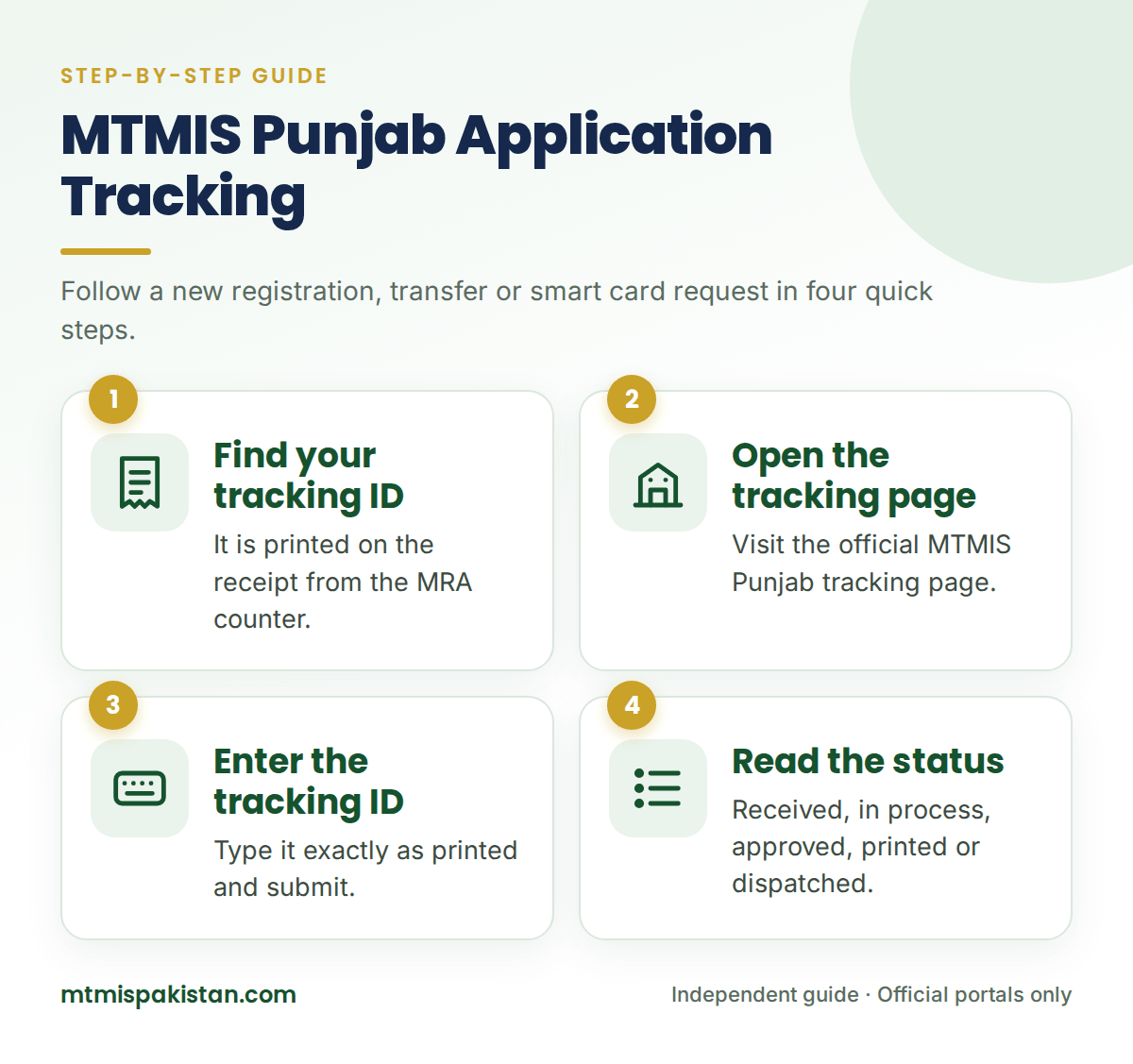
MTMIS Punjab application tracking takes less than a minute once you have the tracking ID. Follow these steps:
- Open the tracking page. Visit the official MTMIS Punjab tracking page run by the Excise department.
- Enter your tracking ID. Type it exactly as it appears on your receipt, without extra spaces.
- Submit the search. Complete any security check the page shows, then submit.
- Read the status. Note the current stage and the date of the last update.
- Take the next step. If the card shows as dispatched, switch to courier tracking on Pakistan Post.
What Each MTMIS Punjab Application Tracking Status Means
The exact wording in MTMIS Punjab application tracking can change over time. However, applications in Punjab follow the same general sequence, and knowing it helps you judge whether your file is on schedule.
| Stage | What is happening | What you should do |
|---|---|---|
| Application received | The MRA has entered your file and linked it to your tracking ID | Keep your receipt safe and check back in a few days |
| Fee or challan paid | The department has recorded your payment | Nothing, unless the payment does not appear after a few days |
| Under process | Staff are checking documents, biometrics and tax records | Wait, and make sure your phone number is reachable |
| Approved | The department has accepted the registration or transfer | Download your e-registration card for proof in the meantime |
| Card printed | The smart card has left the printing line | Watch for the dispatch update |
| Dispatched | The card is with Pakistan Post | Follow it with smart card tracking in Punjab |
| Objection or pending | Something is missing or needs correction | Visit the MRA office with your receipt and original documents |
How Long Does an Application Take in Punjab?
No fixed timetable applies to every file. Processing time depends on the type of application, the workload at your MRA office and the smart card printing backlog.
As a rough guide, a straightforward transfer usually gets approved within days to a couple of weeks. Printing and postal delivery then add more time. So, if your MTMIS Punjab application tracking shows no movement for about a month, it is time to follow up rather than keep waiting.
Meanwhile, you do not have to go without proof of registration. Once the department approves your application, you can download your smart card in Punjab as a free e-registration card.
Lost Your Tracking ID?
Losing the receipt is common, and it does not lock you out of MTMIS Punjab application tracking for good. Try these options in order:
- Check your phone. Look for a photo of the receipt or an SMS from the department.
- Check the vehicle record. Run a vehicle verification in Punjab; the result often shows application details such as the application type, challan paid date and current status.
- Visit the MRA office. Take your original CNIC and the vehicle's registration number, and staff can look up your file.
Why MTMIS Punjab Application Tracking Shows Delays
When MTMIS Punjab application tracking shows no progress, the cause is usually one of a handful of problems. Knowing them helps you fix the problem before you even call the helpline.
Biometric Mismatch
The department matches the buyer's and seller's fingerprints with NADRA records. Worn or injured fingertips sometimes fail the match, so the file waits until the person returns for another attempt.
Token Tax Arrears
If the vehicle carries unpaid token tax, the department usually holds the transfer until someone clears the dues. Therefore, check the tax status in a vehicle verification before you apply.
Missing Bank Clearance
A leased vehicle needs the bank's clearance letter before ownership can move. Without it, the application stays pending, however long you wait.
Physical Inspection Issues
Sometimes staff need to inspect the chassis or engine number, especially after a repaint, an engine change or an old record with unclear details. In that case, the office asks you to bring the vehicle in.
Application Stuck? Here Is What to Do
Sometimes a file stops moving because of a missing document, a failed biometric match or a tax arrear. In most cases, a quick follow-up solves it.
Call the Helpline First
First, call the Excise and Taxation helpline on 1035 with your tracking ID ready. Then describe the stage your application shows and how long it has stayed there.
Visit the MRA Office
If the helpline cannot resolve it, visit the MRA office that received your application. Take your receipt, original CNIC and any documents you submitted, because an objection usually needs a signature or a missing copy.
Escalate Through the Citizen Portal
If the office still does not respond, lodge a complaint on the Pakistan Citizen's Portal app. Include your tracking ID, the dates of your visits and the status the portal shows.
After the Application: Tracking Your Smart Card
Application tracking ends when the department dispatches your card. From that point, Pakistan Post handles the delivery, and a different system shows its progress.
Therefore, switch to smart card tracking in Punjab once your status shows dispatched. For every other service, visit our MTMIS Punjab guide.
Frequently Asked Questions About MTMIS Punjab Application Tracking
Is MTMIS Punjab application tracking free?
Yes. The official tracking page is free to use, and you can check your status as many times as you like. Besides, you never need to pay a website or agent to see your application status.
Can I track my application with my CNIC instead of the tracking ID?
The online tracking page works with the tracking ID from your receipt. If you have lost it, check the application details in a vehicle verification result, or visit the MRA office with your original CNIC.
Why does my application show no status at all?
Usually, the MRA office has not yet entered or synced the file, or the tracking ID contains a typing error. Wait a day or two after applying, and then re-enter the ID carefully.
Does MTMIS Punjab application tracking work for motorcycles?
Yes. Motorcycle registrations and transfers follow the same process as cars, and MTMIS Punjab application tracking shows their status in the same way.
My application is approved. Why has the smart card not arrived?
However, approval is not the final stage. After approval, the department prints the card and hands it to Pakistan Post. Check for a "printed" or "dispatched" update, and then follow the courier with smart card tracking.
Can someone else track my application for me?
Yes. Anyone with your tracking ID can check the status, which is handy when a relative or dealer handles the paperwork. For the same reason, share your receipt only with people you trust.
Stay One Step Ahead of Your Paperwork
A vehicle transfer only feels complete when the smart card sits in your wallet. With MTMIS Punjab application tracking, you know where your file stands at every stage, and you can act the moment something stalls.
So, keep your tracking ID safe, check the status every few days, and follow up promptly if nothing changes. If you need help, reach us through the Contact Us page.
Disclaimer: MTMIS Pakistan is an independent information website and is not affiliated with the Excise, Taxation and Narcotics Control Department Punjab. Processing times and status labels can change, so always confirm with the official department.
Last reviewed: September 2026