
Download Smart Card Punjab: Get Your Vehicle E-Registration Card Free
Waiting weeks for a registration card while your new car sits in the driveway is frustrating. Fortunately, you can now download your smart card in Punjab as a free e-registration card and keep it on your phone within a couple of minutes.
The Excise, Taxation and Narcotics Control Department introduced this service so that owners can download a smart card copy in Punjab instead of waiting for the physical card to arrive by post. All you need is your vehicle's registration number and its chassis number. This guide walks you through the download, explains what the card contains and shows you how to fix the errors people run into most often.
E-Registration Card vs Physical Smart Card
Before you download your smart card in Punjab, it helps to know how the digital card differs from the plastic one that arrives by post. They carry the same registration details, but they reach you in very different ways.
| Feature | E-registration card (download) | Physical smart card |
|---|---|---|
| What it is | A digital copy of your registration card | A printed registration card |
| How you get it | Download it from the official portal | Pakistan Post delivers it to your address |
| Cost | Free | Reported at Rs 1,300 when smart cards became mandatory in July 2024 |
| When it is ready | As soon as the department updates your record | After printing and courier delivery, often several weeks |
| Best use | Proof of registration while you wait, and a backup copy | Your main registration document |
In short, the e-registration card fills the gap. It does not replace the physical smart card, so keep tracking the card until it reaches your hands.
What You Need to Download Your Smart Card in Punjab
The form to download a smart card in Punjab asks for only two details. However, both must match the department's record exactly.
- Registration number: Type it as it appears on your receipt or old registration document, including the year code on newer numbers, for example ABC-24-1234.
- Chassis number: Use the full chassis (frame) number. You can find it on your sale invoice, your previous registration book or card, or the stamp on the vehicle's frame.
- A phone or computer: Any modern browser works, and a PDF viewer helps if you want to save or print the card.
The chassis number acts as a simple security check. Since only someone with the vehicle's documents knows it, strangers cannot download your card just by noting your number plate.
How to Download Smart Card Punjab, Step by Step
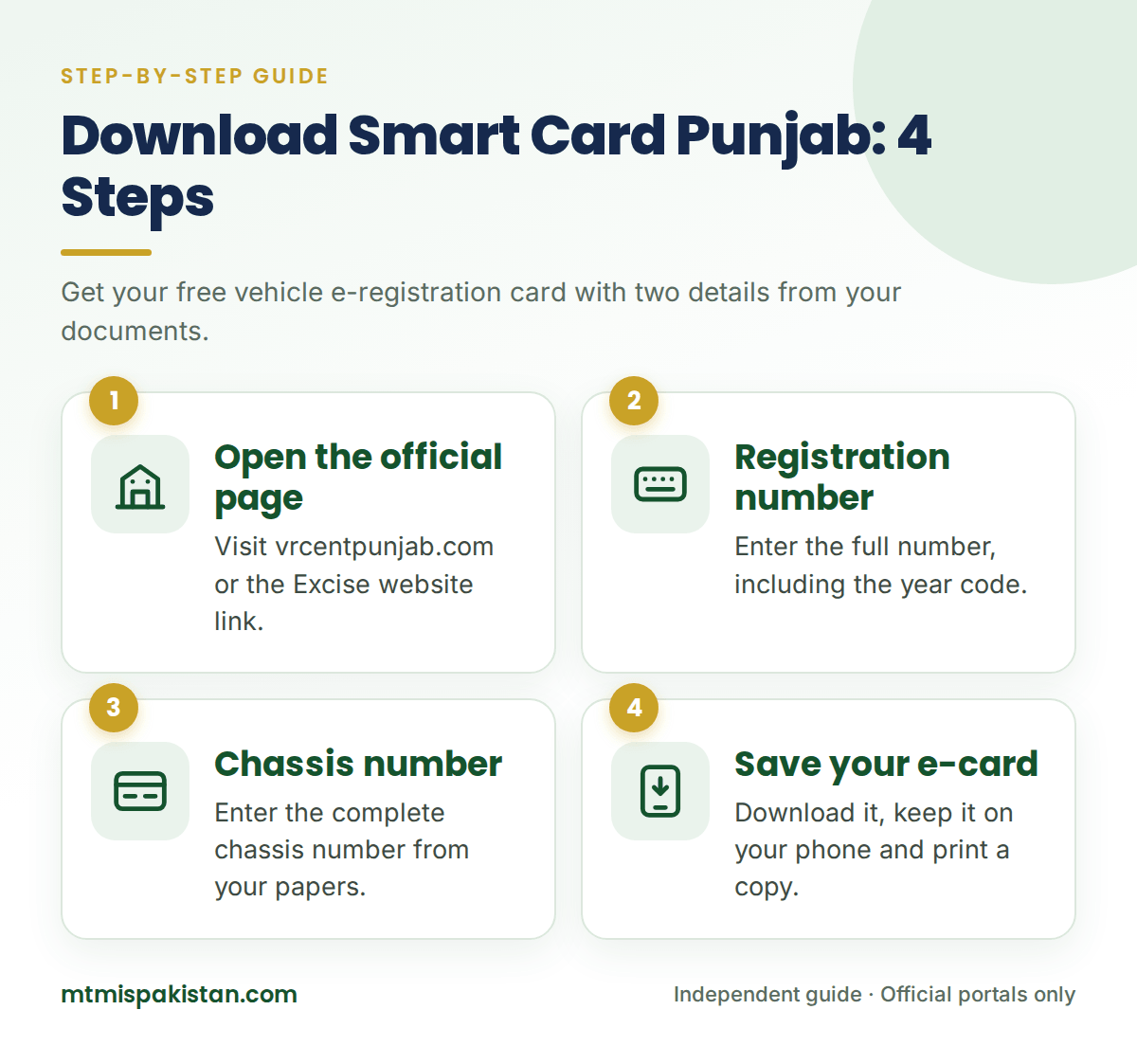
You can reach the page to download your smart card in Punjab from the Excise department's website or open it directly. Follow these steps:
- Open the official page. Visit vrcentpunjab.com, or click the "E-registration Card" link on excise.punjab.gov.pk.
- Enter the registration number. Type the full number with the correct letters, year code and digits.
- Enter the chassis number. Type the complete chassis number and double-check every character.
- Search for your card. Submit the form, and the portal matches both details against the MTMIS record.
- Save your card. Download or screenshot the e-registration card, and keep a printed copy in the glove box as a backup.
The Excise department also announced the service officially on its website in January 2025, under the notice "Introduction of E Registration card to Motor Vehicles Owners". So, you can confirm the link there if you ever doubt a website's authenticity.
What Your Punjab E-Registration Card Shows
The digital card mirrors the information on the physical smart card. When Punjab first introduced smart cards in October 2018, the department listed these details:
- Owner's name and CNIC or passport details
- Registration number, registration date and any previous registration
- Chassis number and engine number
- Maker's name, class of vehicle and body type
- Year of manufacture, colour and seating capacity
- Horsepower or engine capacity (cc) and number of cylinders
- Token tax expiry date and the assessed annual tax
Take a minute to read the card after you download your Punjab smart card copy. If any detail looks wrong, report it at your MRA office quickly, because a wrong chassis or engine number can cause trouble at a police check or during a future sale.
Can You Use the Downloaded Card on the Road?
The department launched the e-registration card with a clear message: do not wait for the physical registration card, download it instead. For that reason, many owners keep the digital card on their phone as proof of registration while the plastic card is on its way.
Even so, the physical smart card remains your main document. Carry your original CNIC with the digital copy, and switch to the physical card as soon as it arrives. If a traffic officer has doubts, they can confirm your record in seconds through vehicle verification.
Punjab Smart Card Download Problems and How to Fix Them
When a Punjab smart card download fails, the cause is usually a small typing error or a timing issue. The table below lists the common ones.
| Problem | Likely cause | How to fix it |
|---|---|---|
| "Record not found" | Missing year code or a typing error in either field | Re-enter both details slowly, and check letters that look like numbers |
| Chassis number rejected | You typed a partial number or confused O with 0 | Copy the full number from your invoice or registration document |
| Card shows the previous owner | The transfer is still in process | Check the status with application tracking and try again after approval |
| Page does not open | Security checks or heavy traffic on the site | Try another browser or network, then reload the page |
| Card will not save | Browser download settings | Take a clear screenshot, or print the page to PDF |
Lost, Damaged or Never Received the Physical Card?
A downloaded card solves the short-term problem, but you still need the physical card in the long run. What you do next depends on where your card is.
The Card Is Still on Its Way
First, confirm that the department has printed and dispatched it by using MTMIS Punjab application tracking. Then follow the parcel with smart card tracking in Punjab on Pakistan Post's system.
The Card Came Back Undelivered
Pakistan Post returns a card when it cannot find the address or the recipient. In that case, check the department's return shipment page, where your shipment number is simply your vehicle registration number. After that, you can collect the card from the MRA office that handled your application.
The Card Is Lost or Damaged
For a lost or damaged card, visit your MRA office and apply for a duplicate. Staff will confirm the current fee and the documents you need, which usually include your original CNIC.
Stay Safe from Fake Download Websites
Because so many owners download the smart card in Punjab, copycat sites and apps now promise "instant smart card downloads" for a fee. Protect yourself with a few simple rules:
- Use only the official page, which the Excise department links from its own website.
- Never pay for the e-registration card, because the official download is free.
- Never share an OTP, bank details or photos of your CNIC with a download site.
- Remember that independent guides like MTMIS Pakistan only explain the process and link to the official portal.
Frequently Asked Questions About Downloading Your Punjab Smart Card
Is it free to download the smart card in Punjab?
Yes. The official service lets you download the smart card in Punjab, in its e-registration form, at no cost. Only the physical smart card carries a fee, which you pay at the MRA office when you register or transfer the vehicle.
Can I download a Punjab smart card for a motorcycle?
Yes. The service covers motorcycles as well as cars. Simply enter the bike's registration number and full chassis number, and the portal shows its e-registration card in the same way.
Can I download a smart card without the chassis number?
No. The portal needs both the registration number and the chassis number. If you do not have the chassis number, check your sale invoice or old registration document, or read it from the stamp on the vehicle's frame.
How soon after a transfer can I download the new card?
You can download it once the department approves the transfer and updates the record. Until then, the portal may show the previous owner, so track your application first.
Does the downloaded card replace the physical smart card?
No. The e-registration card is a convenient digital copy and a useful backup. The physical smart card remains your main registration document, so keep tracking it until it arrives.
Can I download a smart card for a vehicle registered outside Punjab?
No. This service covers vehicles registered with the Punjab Excise department only. For Islamabad, Sindh or other regions, use that region's official portal, which you can find on our MTMIS Pakistan homepage.
Keep a Digital Copy in Your Pocket
When you download your smart card in Punjab, you gain instant proof of registration and a backup that never gets lost in a drawer. It takes two details, two minutes and costs nothing.
So, open the official portal, save your e-registration card, and keep tracking the physical card until it arrives. For every other Punjab service, visit our MTMIS Punjab guide, or tell us about a broken link on the Contact Us page.
Disclaimer: MTMIS Pakistan is an independent information website and is not affiliated with the Excise, Taxation and Narcotics Control Department Punjab. Fees and procedures can change, so always confirm them with the official department.
Last reviewed: September 2026